Available In: Docs Made Easy Basic and Pro
Parameter Value : {{TableGroup:RelationshipName:GroupByField:Show/Hide}}
Parameter Requirements : Child relationship Object
Parameter Description : The TableGroup parameter in Docs Made Easy groups related child records in a table based on a single field value. Unlike TableGroupStart, it is written in a single line and allows grouping by only one field. It also includes a Show/Hide option—use Show to display the grouped field value as a header above each group, or Hide if you want the records grouped without displaying that field in the generated document.
- Only one field can be used for grouping.
- Works only with child relationship objects.
- If grouping on lookup fields, use the correct API path (e.g., Product2.Family).
- Ensure records contain values in the grouping field to avoid unexpected blank group sections.
Example -
| {{TableGroup:Opportunity.r.OpportunityLineItems:Product2.Family:Show}} | ||
| {{TableStart:Opportunity.r.OpportunityLineItems}}{{Name}} | {{Quantity}} | {{TotalPrice}}{{TableEnd:Opportunity.r.OpportunityLineItems}} |
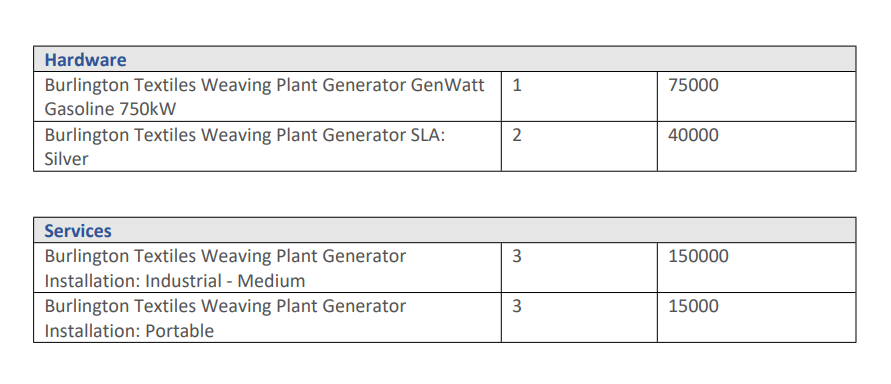
After merging, appears as:
Note:
The TableGroup format can also be used in conjunction with custom SOQL queries. In such cases, instead of using the standard Object.r.RelationshipName notation, you must use the alias defined in the query.
Was this article helpful?
That’s Great!
Thank you for your feedback
Sorry! We couldn't be helpful
Thank you for your feedback
Feedback sent
We appreciate your effort and will try to fix the article