Available In: Docs Made Easy Basic and Pro
Parameter Value: \# NumberCulture1
Parameter Requirements: The locale code should be added in the Assign Behaviour section.
Parameter Description: The NumberCulture parameter in Docs Made Easy controls how numeric values are displayed and formatted in the generated document based on a specific language–region (culture) setting.
When applied, this parameter:
- Changes the numeral system based on the selected culture.
- Applies region-specific number formatting, such as: Decimal separators, Digit grouping styles.
Unlike currency formatting, this parameter does not add any currency symbol. It only affects how the number itself is represented.
Example :For Dutch (Netherlands) locale.

| SYNTAX | ACTUAL VALUE | OUTPUT |
| {{Opportunity.Amount \# NumberCulture1}} | 89000.02 | 89.000,02 |
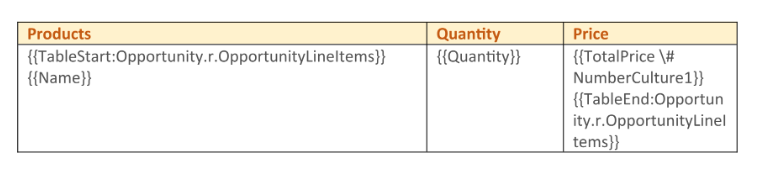
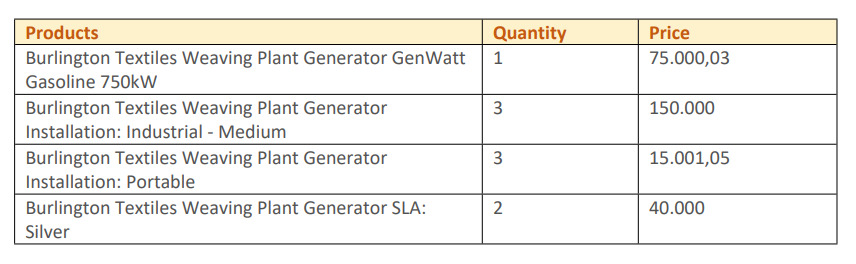
Other Example: For Opportunity LineItems
| SYNTAX | OUTPUT |
 |  |
Note:
Docs Made Easy supports multiple NumberCulture parameters simultaneously (e.g., NumberCulture1, NumberCulture2, etc.), allowing different number formats to be applied in different parts of the same document.
Was this article helpful?
That’s Great!
Thank you for your feedback
Sorry! We couldn't be helpful
Thank you for your feedback
Feedback sent
We appreciate your effort and will try to fix the article