Available In: Docs Made Easy Basic and Pro
Parameter Value : {{TableHide:Master:FieldName:Operator:Value}}
Parameter Requirements : Must be used inside a table.
Parameter Description : The TableHide:Master parameter is used to conditionally hide a table in a Word template based on the value of a field from the master (primary) Salesforce object. When the document is generated, Docs Made Easy evaluates the specified field on the master record and compares it with the provided value using the defined operator. If the condition evaluates as true, the entire table containing the parameter is automatically hidden from the generated document.
SYNTAX -
| Product Name {{TableHide:Master:CloseDate:=:Closed Lost}} | Quantity | Price |
| {{TableStart:Opportunity.r.OpportunityLineItems}}{{Name}} | {{Quantity}} | {{TotalPrice}}{{TableEnd:Opportunity.r.OpportunityLineItems}} |
OUTPUT -
| Opportunity Stage Name = Closed Won | 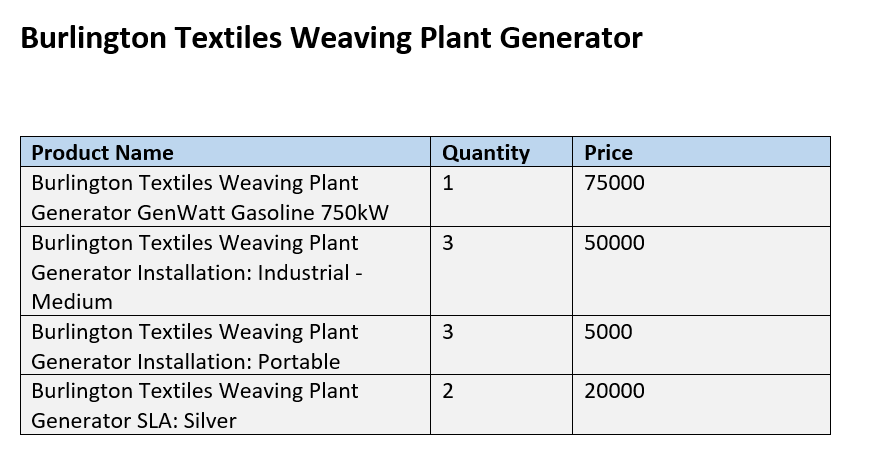 |
| Opportunity Stage Name = Closed Lost | 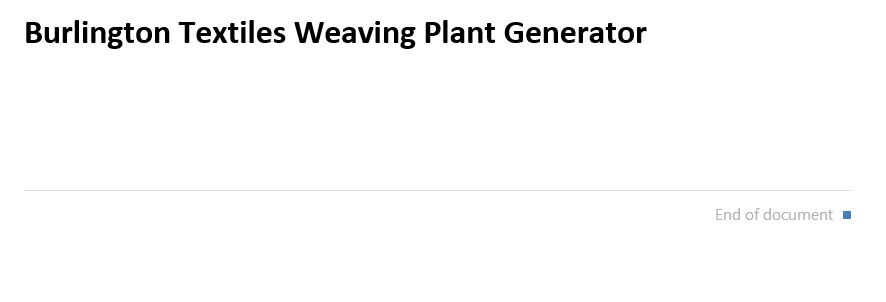 |
Note:
The parameter works with common comparison operators such as equals (=), not equal (<>), greater than (>), or less than (<) to determine whether the table should be hidden.
Was this article helpful?
That’s Great!
Thank you for your feedback
Sorry! We couldn't be helpful
Thank you for your feedback
Feedback sent
We appreciate your effort and will try to fix the article